Drones and the Coordinate Plane

The school year is wrapping up and with just three days left I realized I hadn't used the drones I received for Christmas this year.  In Algebra we are looking forward to their next year, so I rearranged the desks and made a giant coordinate plane on the floor of the classroom.


There was some great build-up since it took me a couple days in advance to lay it all out.  Students from all my classes were wondering what we would do.

I had a bell-ringer about graphing coordinate points.  Then I pulled the drones out and since our students had to turn in their iPads the day before I used my iPhone and iPad as the two driving devices. (It also turned out that is why I have very few pictures.)

Here is the game that I laid out for each team.  


It was a learning curve since I didn't tell them how to fly, but students got the hang of it and it moved pretty quickly.  Here is a picture of one student's drone landing and another's trying to find the spot.


Next year I will have students graph the coordinates who are not flying the drone on a separate sheet of paper and help give directions on which way to fly the drone.  It was a great end of the year activity, will definitely use this in the classroom next year.


Law of Sines: Google Cardboard

Earlier this week I created my next Google Cardboard activity with Law of Sines.  I taught law of sines earlier in the year and this was a good way to get students engaged with just a few days left of school.

Here is the worksheet: https://goo.gl/1BY83U

I wanted to take pictures, but my phone was being used during the lesson.


The basic concept is that students are given a distance from the Eiffel Tower.  Then they have to find the angle of measure to the top.  The next thing they have to do is move around (I said 5-6 spaces), but could be moved around further or put in a different location.  They then have to find the angle the second time.  Using the law of sines they can find their new distance to the Eiffel Tower.

They proceed through the activity with a partner and switching half-way.  The math is more difficult than the first Google Cardboard activity I created, because students in order to find the other angle, must use some critical thinking and know that the angle you are measuring is the outside of the triangle you are looking for.


Here is the first example sketched out:


#15: Conic Section Cartoons

One of my favorite parts of the end of the year is the conic section test I give.  I give students a blank comic section of Calvin and Hobbes and they color and have to describe one of the conic sections. (Circle, Parabola, Ellipse, or Hyperbola)  They use vocabulary and teach the subject to another in 8 frames. I also gave the students a chance to make their own comic strip and got an excellent response this year.

I wanted to give students a chance to show what they know in an unique way.


I also gave students a rubric and directions.

Students had to create a comic strip that explains the thought process involved in one of the following: Parabola, Circle, Ellipse, or Hyperbola.  The comic strip should explain the characteristics of the conic section, and it should show an understanding of the process.

Here is what the rubric looked like.  I gave students two days in class to work on it and it was due by the end of the second day.


Block Craft 3D and Orthographic Projections

I have wanted to use Minecraft in the classroom for a couple years now, but Minecraft is a paid app and I have found a free alternative. I was surprised to find out how many already had Minecraft on their iPads already and already had made wonderful buildings.

We are using Block Craft 3D for an end of the year geometry unit to get students ready for full time Geometry. I pre-taught orthographic projection, area, perimeter, and volume.

Students were given two days to make their own building or house using the app.  Students could update and use their Minecraft creations as well.


When students create their building they have to find the sides, front, and top.  The had to take screen shots of the sides and find the orthographic projection of each side.


The final product will look something like this.  This is a great culminating project for students and also a great introduction to next year where they will be more experienced with Geometry.


#14: Google Classroom

Google Classroom is a learning management platform where students and teachers can interact in an online space.  This is a good tool, but our district uses eBackpack where students are already loaded in and students feel comfortable using the tool.  I am sure in the future we will go to Google Classroom, because it is free.

If I had all my materials in my google folder it would be easier to use, but since they are on my computer it makes eBackpack easier to use.

The only other thing that makes Google Classroom lower of a priority is that I want to use the blogging platform SeeSaw more in the classroom next year which will take the place of Google Classroom.

Curious Ruler

There is a new app for finding the measurements of things with the iPad, called Curious Ruler.  There is a paid app that costs .99$ or there is a free one, which works just as well.  This ruler uses reference objects such as a dime, penny, lego brick, CD, or an iPhone 5s.  With these it uses a proportion tool to find the height of the reference object then finds the length of the object.

https://itunes.apple.com/us/app/ruler-a-curious-tool/id895167573?mt=8

Here are some things I measured from my iPhone 5s.


It is a quick and easy tool to find measurements on the iPad.  Will definitely be downloaded as one of the apps I use most for next year.  Finding the measurement of objects has been a hassle, because rulers are becoming more obsolete with more companies going to laser measurements for exact results.

#13: Blogging

I like blogging, I think my students enjoy it and using SeeSaw for the first time gave me some insight on how it will change my teaching.  I gave students a chance to blog using SeeSaw's note feature and this is what they came up with:


I liked the simplicity of them sending me pictures or just a quick note of what they have learned.  

Students had to write two paragraphs explaining the similarities and differences between circles and ellipses.  


I will keep using SeeSaw next year.

#12: Podcasts

I have been an avid listener of podcasts for the past two years.  My morning commute to and from work now tops a hour both directions and the radio just wasn't cutting it.  I had heard things about a new-"ish" podcast called Serial, which is amazing, but that got me hooked.  Now instead of listening to music, I listen to things I care about on Podcasts.

The best thing about podcasts from an educators perspective is that if you are 1-1 with iPads you can download them at school and have your students listen to them at home.  In my class I had students go to Podcasts and download an episode of the Math-Dude on Graphing Parabolas, they took notes as they went along and completed a worksheet after.

There are lots of great podcasts for any classroom including history, art, and science.

Completely Optional Knowledge Podcast is a great, short podcast for interesting science questions.

Presidential provides short biographies and interesting insights on the history of presidents leading up to the election.

Stuff You Should Know is a general podcast that informs on a wide range of subjects.  There are lots of great podcasts around and new ones become available everyday.


Next year I will try to incorporate this lesson, with the walking classroom.

Conic Section Surgery


I had students fill out a worksheet with their guided learning experience.  They cut the Play Doh in different ways to find circle, parabola, ellipse.  

Here is the link to the worksheet: https://goo.gl/1Ih64F

Materials:
Play Doh
Plastic Knives
Latex Gloves
Face masks

I made homemade PlayDoh which some of them didn't turn out as well as they could have.  The gloves made it more of an experience.  Next year I will see if I can get something to make it feel more authentic.


#11 Gamifying the Classroom

We have spent a week reviewing for the 11th grade NeSA test.  To make it more exciting than doing worksheets, I decided to gamify the lesson.  Instead of doing review questions from Algebra, Geometry, and Algebra 2 classes on a worksheet I split the questions between Kahoot, Quizizz, and Quizalize.  Students worksheet looked like this one down below.


Students put the name of a country and the countries flag.  We then did three different quizzes on different platforms, students recorded their score, and the three highest scores got a prize.  Here are some example worksheets students filled out:


Students were more entertained and engaged than doing a worksheet.


Students did a great job, some of the quizzes were more difficult I will provide links to the games we played, but overall students learned more than doing a worksheet and giving feedback.  I posted a leaderboard the next day, students liked seeing who won and what country they were.

Quizizz Algebra Review

Kahoot! Geometry Quiz

Quizalize Algebra 2 Review


I will improve this lesson for next year, possibly including badges and holding the olympics over multiple days.  Students being this engaged will help students retain more information during the review and learn new content with more of a passion.

#10: Live Streaming

Already on #10 of the 16 Things Teachers should try in 2016.  I have liked all the ones I have done so far and have pushed me as an educator.  The rest of them will challenge me, especially blogging, podcasting, wearable, and gamifying a lesson.

Since this week I choose live streaming, it was a difficult endeavor but found a good choice in using Periscope.  Periscope allows you to "go live" anywhere in the world by using your smart phone and users can ask you questions or post comments live on the app.

I used this with our open house we did this last fall.  Since this video is not currently going, I posted on Twitter that students parents can follow my account and did a quick walkthrough of my room and things that will happen in there if I had their son or daughter in class.


Our school has been struggling to get parents into open houses, parent teacher conferences, and sporting events.  By allowing parents to access these events where they are more comfortable and in a setting that they know these events can be more accessible to those parents.

I didn't stay live the whole open-house.  Just made it accessible after for people to watch.

Coding Sequences with BB-8

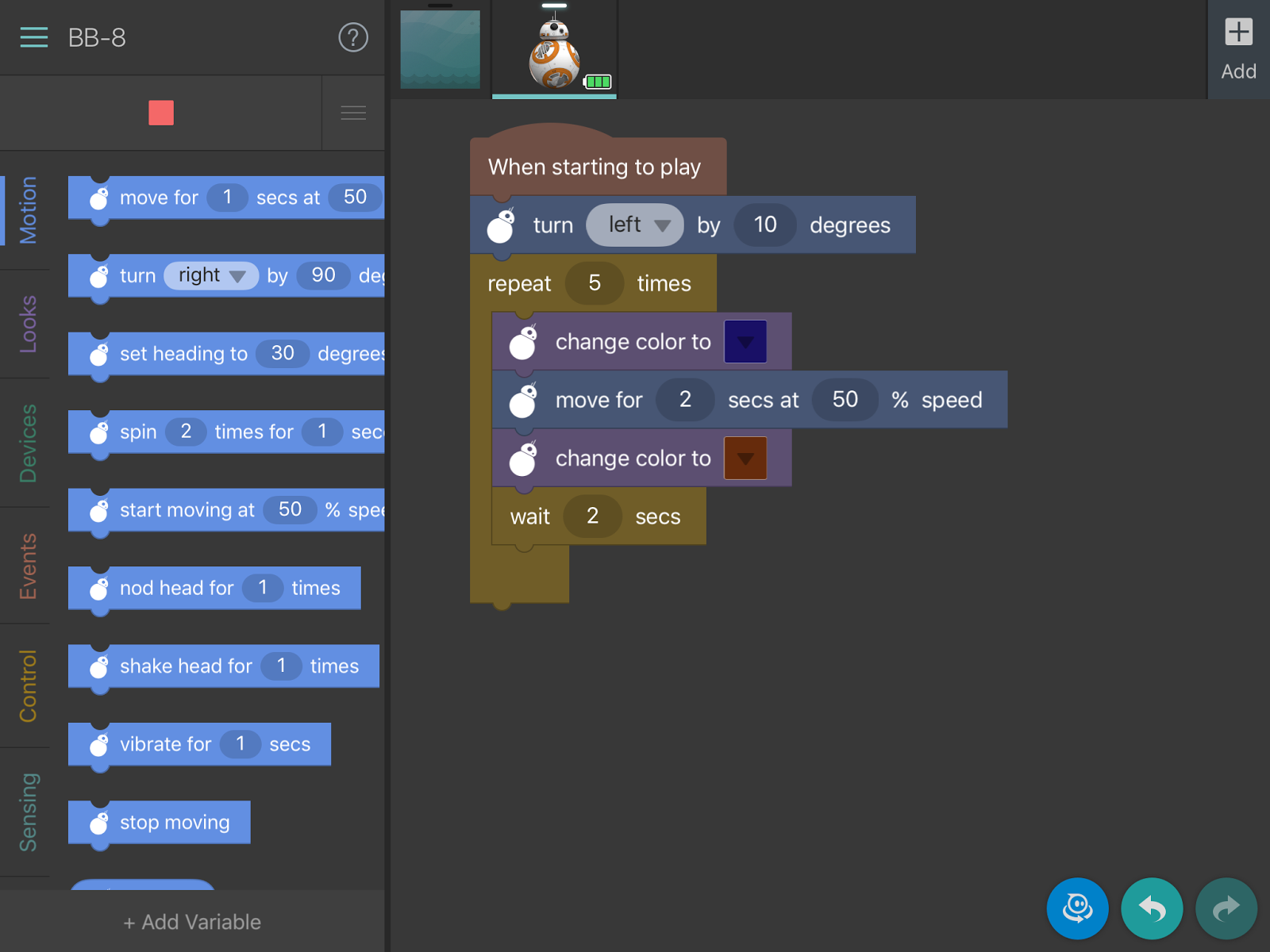
I wanted to do another coding project after "Code Day" I thought the students would benefit from seeing it again.  We had a day between our short chapter on sequences/series and NeSA review of next week.  In class we introduced arithmetic sequences, geometric sequences, and series.  I programmed the BB-8 with a code and asked students what the sequence was, then what the rule was?


Students explained that the sequence was 3, 6, 9, .....

Then what the rule was? Adding three every time.

Then I gave them code and asked them again what the sequence was suppose to look like and what the rule was.


The 10 degrees was to keep it on the number line.

I asked what the sequence should be. Some students said 2, 4, 6, 8, ...

I was impressed with my students, because they asked how far was 2 seconds at 50% speed.  So we played it with the BB-8 and it was somewhere between 2 and 3.

I asked them to download the "Tickle" app.

Students then were to create their own sequence where the BB-8 had to move across the number line. Students had to take a screen-shot of the code and write what the sequence was on Notability and include the photo.


I was incredibly impressed with the amount of effort put in to it.  Even with just one BB-8 from Sphero all students had the chance to get test their BB-8's code.

Here is an example of student's code:


It was a great activity for students to use code and their knowledge of sequences and rules together.


#9: Start a YouTube Channel

I have been a big fan of YouTube and have had a channel for a while, but this week I have been using YouTube more as an outlet for students.  I took some video of a coding project we did this week, a NeSA Review assignment with QR codes, and a VideoScribe for Teacher's Guild. (Whew... it has been a busy week.


  • To start with was my BB-8 project which will be more to come, but we went over sequences and and students had to code their own sequences and find out what that sequence was.


  • My second video was actually multiple videos and put in QR codes for our NeSA Review that we have next week (during my observation).  Students will get a worksheet with different types of algebra problems and I made videos to review each type of question.


Lastly was my VideoScribe, which is becoming one of my favorite presenting apps.  It did take some time to learn, but became easier to use the more that I used it.  It was a good tool that I might have my students use later this semester.


#8: Sketch-Noting

Sketch-noting was a blast for me and the students.  We talked about taking notes and thought sketch-noting was a powerful tool for synthesizing critical information and provide key insights on what note-taking in class looks like.  I collected most of the sketch-notes and made it a participation grade, because I wanted to see what some of them looked like.  I created a template on the board of what I would write down if I was in class and included some of the nuances of what sketch-notes were.

We used this site: http://uxmastery.com/sketchnoting-101-how-to-create-awesome-visual-notes/

To understand why some of these things pop out and make you remember.

I now realize looking back that math is a very difficult subject to try sketch-noting especially the section on radical expressions.  I gave students the option to try sketch noting on paper or use the iPad app Notability to help them.

Here is a student example:


It turned out pretty good, they got the general concept of putting things in boxes.  It was difficult to draw pictures and include thought bubbles, but for right now it is a start and will want to do this with a more user-friendly topic.

Here are some other examples:


FINALLY!!! Designing Angry Bird Levels

If you have been a long term subscriber you know that I mentioned Angry Birds before:


Finally, I put my words into action and give my Algebra students a chance to show their knowledge of parabolas.  Here are the directions and rubrics I used to grade their performance tasks. 


#6: Voxer Chat and Buncee

It is becoming more and more difficult to find Things to Try in 2016, since I have already done things like 3D printing in my classroom last year in 2015, I won't make my students do it twice unless I can think of a really cool project.  So this week was suppose to participate in Voxer Chat.

If you haven't heard of Voxer you need to.  It is an amazing tool that allows you to communication with your voice, with text, or with pictures to one or a group of people.  I recently have gotten more involved in BreakOutEDU and designing more puzzles, but the Voxer Chat helps a tremendous amount with getting feedback instantly from a group of knowledgeable people. 

It would be interesting to get something started with a class where students can instantly communicate in your classroom or have wide staff development where they use Voxer instead of getting 25 emails a day from your colleagues. 


Second part of this is Buncee.


https://www.edu.buncee.com/

You can create them for your class, I used one for a bell-ringer and it really simple.  You can also have your students create them, we used them for a different lesson and used them as exit tickets.

It is really easy to use this tool with drag and drop directions.  The best part is you can include YouTube videos and make it very simple to flip your lessons if you send it to all of your students.

Here are a few of my bell-ringer examples:


The last one had a YouTube video embeded and makes it easy to push to students and have them watch a quick YouTube video explaining, in this example, square roots and have them coming to class with previous knowledge of what square roots are.

Below I had students create a Buncee for an exit ticket where students had to one for three things they learned about discriminants.


They are quick and easy for students to put together, disregarding downloading time, it took about 5 minutes for students to get use to the tool and send it to me.

Great tool and app for classroom purposes!!